
Web Vocabulary
Below is a list of common terms that come up that you can visit and reference anytime you’d like to jog your memory. We try not to dig too deep into tech-talk and just let you check on only what you need to in order to round out your talking points and help us find out what we need to know.
Table of Contents
Accessibility (ADA Compliance)
Accessibility refers to an inclusive design practice of making sites as user-friendly and accessible to as many people as possible. Its primary focus is to remove barriers that would otherwise impact a person with disability from interacting meaningfully with your website – this avoids alienating a client’s potential users/customers, and has become a legal requirement in many states. Moving forward, all sites will come with ADA compliance standard.
What this means to a client
The benefits to a client for observing inclusive design and accessibility are manifold.
For starters, observing ADA Compliance guidelines is the law. More than that though, it’s good for business and good for SEO.
You’ll be able to read more about the benefits/talking points of this soon – we’re building out another page that’ll describe all the benefits of an EOS website you don’t already know about!
What this means to us
Mostly it’s a number of practices that we need to be sure to observe. They’re consistent enough and valuable enough that it makes sense for Accessibility to just be one of our existing features that we build into every site.
Our clients are covered and it’s good for our reputation.
Functionality
Functionality is our catch-all term for pretty much anything interactive on a website.
Identifying Functionality
Note: Linking to an existing portal or social media location is not functionality. We’re just providing a link to an external source.
Common Examples of Functionality
- On-screen animations (e.g. fading, sliding, spinning, etc.)
- Contact forms
- Sliders and carousels
- On-hover effects (e.g. image darkens on hover, button changes on hover, etc.)
- Accordions and toggles
- Pop-ups
Pages
A page is essentially a single document intended to be displayed on a website. It’s the entirety of what is visible beneath the navigation and above the footer as you make your way through/around a site.
In virtually all cases, a link in a site’s navigation represents a page. (But not all of a site’s pages have to be listed in the navigation.)
Counting Pages
- Please count everything in the main navigation’s drop downs, service pages that go deeper than the initial page, etc.
- Keep an eye out for an abundance of pages that list all of the doctor’s individual services. This is the most likely area that our clients will have 20+ pages of repetitive content that we either need to know about, or know to disregard.
- If they have a blog, note if there’s a significant number of posts.
Blog
A blog is a portion of a website dedicated to regularly publishing content relevant to the site’s brand, industry or community. Like social networks, it represents a significant commitment to develop consistent, quality content on the part of either the blog owner or a third-party service.
What this means to a client
They also require active attention from a dedicated individual or team, working to publish and promote relevant content for a specific audience.
Blogs are good for improving SEO ranking, community-building and thought-leadership.
What this means to us
- A clean template for individual posts that can be styled easily by the blog’s author/owner.
- A clean Blog page to list the individual posts, as well as the way that the individual posts display on that page.
- Archive/category pages that populate over time based on content.
This represents several hours of design/web work.

Custom Post Type
A custom post type is, hands down, the most-difficult-to-explain and most advanced piece of tech we’ll ever ask you to try and identify. It’s basically a way to define a “repeating thing” like a templated page for a product on an online store, or a case study page. Typically custom post types have categories or tags.
Something you’re already familiar with – a blog/posts – is actually an example of a custom post type that already exists in a default WordPress installation.
More Detailed
Where sites are made up of pages – and blogs are made up of posts – a custom post type is basically an additional TYPE of website structure, very much like pages or posts.
Think of an item for sale in an online store, and how every results page lists sales items identically, and each page you click into to view the item looks exactly the same. Nobody designed each individual page for every individual product. A custom post type was created (“product”), and the properties of a “product” filter in through results pages and sales-item pages to display things like an author, customer reviews and ratings, years or anything else that may be important.
Custom post types require considerably more up-front planning and investment to successfully structure the site in a logical way. Getting too far into the process without nailing this step could be disastrous down the line.
What this means to a client
Custom post types have only come up so far in our work with plastic surgeons (think Dr. Steele’s procedures).
Where needs are concerned, it’s more about the doctor having a deep body of work that requires them to talk at length about individual cases, show before-and-after pictures, describe the procedure, that kind of thing.
It speaks more to their customers’ need to feel confident about their cosmetic work and connected to the doctor specifically, similar to an artist’s portfolio.
What this means to us
Custom post types are very similar to implement a blog, but typically more complex.
We need to:
- Plan a logical structure to “drop in” the content.
- Design custom page elements/modules to display some pieces of information in some places, and other pieces in others.
- Collect all of the doctor’s content and enter it all into the back-end.
There is no quick or standard way to do this. It rearranges our usual design process and makes the initial investment much more involved. Custom post types potentially represent at least a dozen hours of additional work minimum.
Dropdown
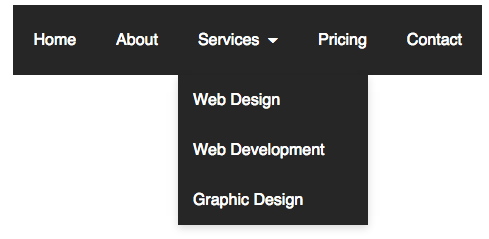
A dropdown is just what we call a section of navigation that opens to display more pages, either when you hover over or click on it.
Main Navigation (Main Menu)
The main navigation is the primary navigation element of a page (visible in the red box).

Counting Pages
The easiest way to get a quick sense of how many pages are on a site is to explore the main navigation. Count the main sections/pages of the site, as well as any pages that “drop down” when you hover over them. If it gets hard to count all the pages, (more than 10) then you know it’s a complex site.
Secondary Navigation
The secondary navigation is usually the topmost element on the page (visible in the corner of the image). It’s where we typically put things like social media links, phone numbers, and email addresses for quick access by a user.
Some sites are complex enough that we’ll put additional menu items in the secondary nav.
Footer
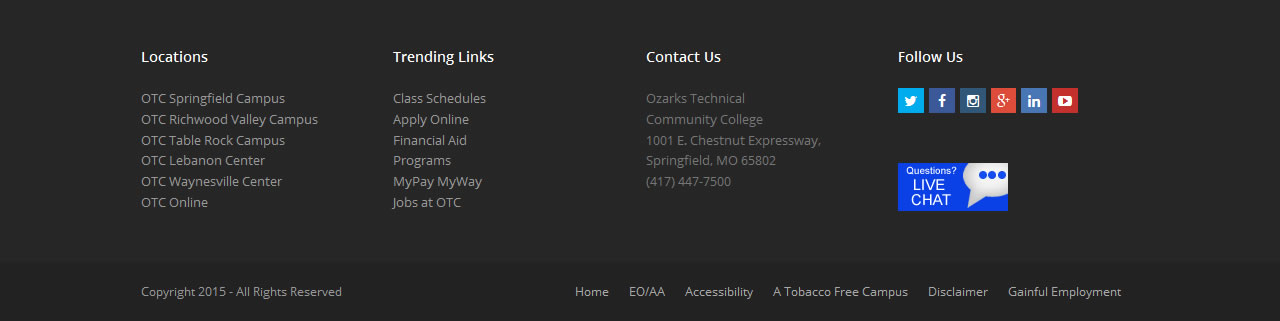
A site’s footer is a global element (i.e. it’s built once and lives everywhere) that sits at the bottom of every page of a website. Its primary purpose is to frame and lend context to the site’s overall structure or purpose, providing easy access to other areas of the site when the user reaches the bottom of the page.
What this means to us
SEO (Search Engine Optimization)
You guys are already pretty familiar with this, but as a quick refresher: SEO is a concept/practice that refers to marrying analytics, copy, design, intent and technology into a holistic whole with the intent of generating more organic traffic to a website.
What this means to us
- Analytics: Choosing keywords relevant to the client and their market, and incorporating them throughout our strategy.
- Writing/Copy: Utilizing the data-driven keywords in our site content to generate a perception of “relevance” in search engines.
- Design: Solving for a specific problem/pain point and employing design concepts to encourage a specific user behaviour on-site.
- Tech: Populating keywords appropriately in the back-end meta of our site, as well as following best practices for how the copy is implemented into the site structure, image descriptions and filenames, anchor tags, site security and mapping, page speed, and a variety of other techniques that encourage search engines to rank our sites more favourably.